Why We Test Every Time Across Eight Linux Environments
We built a lab so we wouldn't have to say, \"It works on my machine.\" We launch virtual machines that combine Ubuntu versions, sessions, input methods, and installation formats, run the same tests, and view the results in a single table.
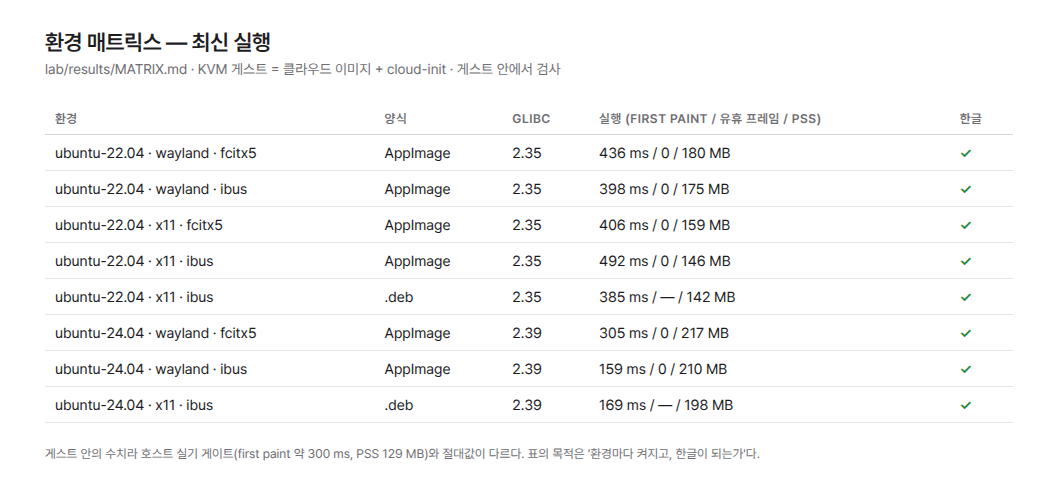
On Linux, saying something “works” is not enough.
Even the same Ubuntu distribution has different system libraries and toolkits depending on the version. Display protocols are divided into X11 and Wayland, and Korean input methods use either ibus or fcitx5. Add installation methods to the mix, and the number of combinations that need to be tested grows quickly.
If it ran on one developer’s computer, that means only one of countless combinations has been tested.
So we built a small lab inside the repository. We launch actual virtual machines for each environment and repeat the same tests. We collect the results in a single table.
What the table checks is simple.
Does the app launch? Can you type in Korean?
We experience the first thirty seconds a user will go through after installing the app before they do.
We Made Each Environment a Single File
The lab uses KVM virtual machines instead of containers. This is because containers have difficulty properly reproducing actual desktop sessions and input method daemons.
We download the distribution’s cloud image and prepare it with cloud-init. The disk is created as an overlay on top of the original image. If something goes wrong, we can discard it and start over.
Each environment is declared in a single file. The file contains the distribution, image, session, input method, and packages to install. If you want to test a new combination, you only need to add one file.
The input method varies by session. On X11, we use xdotool; on Wayland, we use ydotool. Wayland does not have a window list, so we launch the app full-screen in a kiosk compositor. That lets us enter input at the same position every time.
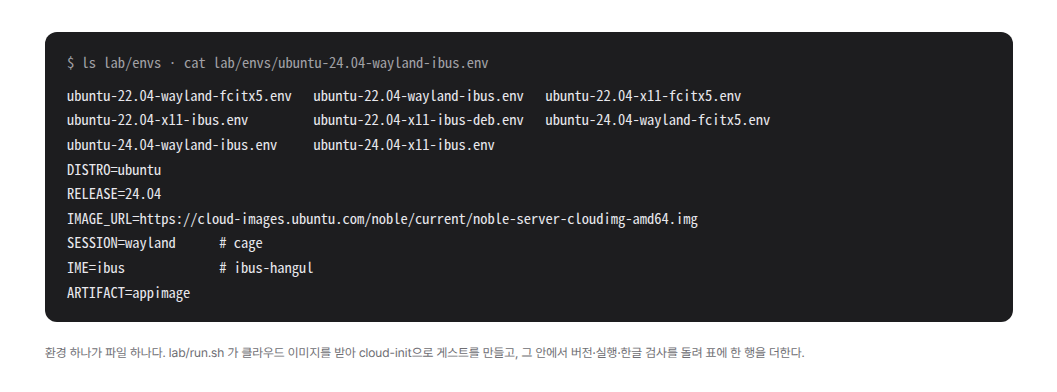
lab/envs, with one of them expanded. The distribution, release, cloud image address, session, input method, and installation format are listed in six lines.The app is built only once on the host. We copy that same binary to every virtual machine.
If we rebuild it for each environment, different compilers and libraries become mixed into the results. That makes it harder to find the cause when something fails. Most importantly, the file users receive and the file the lab tests must be the same.
Virtual Machines Test, and the Host Records
Inside each virtual machine, we check three things.
We check whether the binary runs, whether a window appears, and whether 안녕 appears when we type dkssud.
Each test leaves behind one line of JSON. The host collects the results, saves them to a file, and turns them into a table. The measured results remain in the repository so they can be compared with the next test.
The way Korean input is verified differs depending on the build. In development builds, we can directly check the text while it is being composed. The actual distribution build does not have that feature. Instead, we press Enter, save the file, and then read the contents written to disk.
We learned one thing during this process. What determined the testing method was not the installation method, but the app’s build type.
The First Table Told Us Two Things
On Ubuntu 22.04, the app built with the system toolkit did not open. This was because it could not find a symbol available only in the latest libadwaita.
Conversely, it was also the first time we confirmed that Korean input worked properly with the Wayland and ibus combination.
Based on these results, we decided to include the same toolkit in every installation format. The current eight-row table is a safeguard that checks whether that decision has been broken again.
There were also problems that appeared only in real environments. Unlike desktop Ubuntu, the cloud image did not include the GTK4 input module or the initial input mode. We had to install them separately during provisioning.
The ibus module had to match the daemon version installed in the distribution. The way the input tools were used also differed by distribution. We had to split the test scripts to match each environment.
To conserve the host’s memory, we run no more than two virtual machines at the same time. A virtual machine is shut down as soon as its results are received.
These were all problems that were difficult to find by reading the code alone. The same code produced different results depending on the environment. That is why we needed the table.
The Table Does Not Promise Performance
The table also records the time it takes for the first screen to appear and memory usage. But we do not use them as performance metrics.
The virtual machines render the screen in software without a GPU, and we measure only once immediately after booting. The values can differ each time they run. Performance criteria are determined using the median of three measurements on a host with an actual GPU.
What matters in this table is not the milliseconds, but the checkmarks.
Environments we have not tested are left blank. Fedora and Debian, actual GNOME sessions, and portal dialogs such as the file chooser are not yet in the table.
We do not fill untested cells with “it will probably work.”
We cannot decide which environment users will choose. What we can do is enter that environment first and try launching the app.