How to Build an Editor That Doesn’t Break Korean Text Composition
When you write at length in Korean, there are moments when the final syllable disappears or a word splits apart. That is not a typo, but a matter of where the editor handles composition.
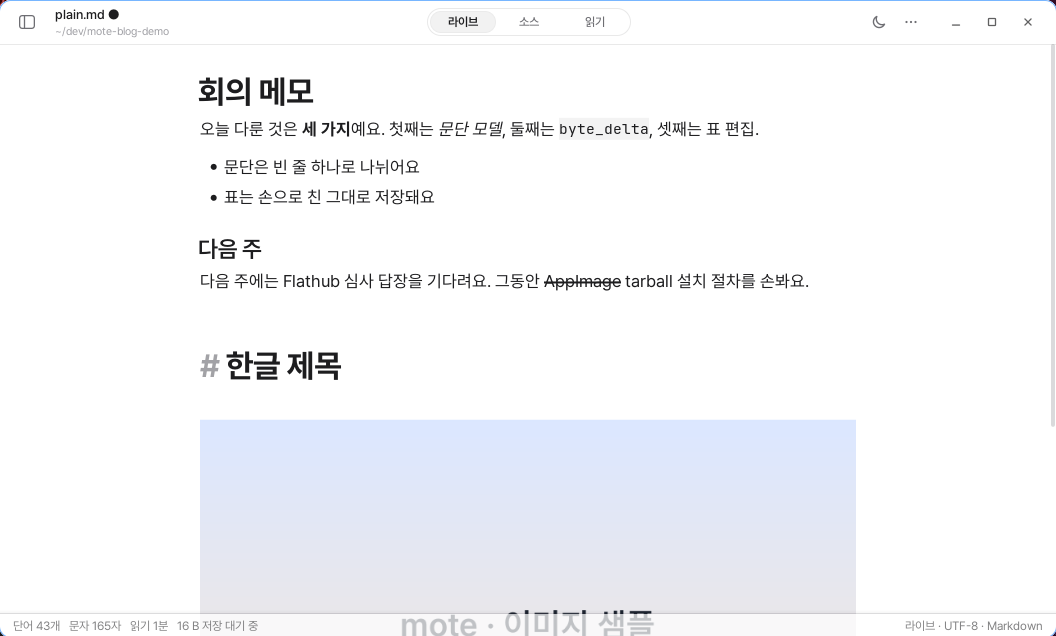
# is faintly visible, while the text retains the heading’s size and weight.When you write in Korean, you sometimes encounter strange moments. A character disappears at the end of a line, and after switching to another window and coming back, the final syllable is entered twice. Sometimes the cursor even moves to the wrong place while you are typing.
At first, it is easy to think that you made a mistake. But most of the time, it is not a problem with your hands. It happens because the editor does not handle Korean “composition” properly.
To enter a single Korean character, you have to press consonant and vowel keys several times. Until the syllable is complete, it is visible on the screen but is not yet a confirmed character. This state is called composition.
This state is uncommon in English, but when writing Korean, you are almost always composing. That is why even a small problem with composition handling becomes a major inconvenience for Korean users.
The publicly reported issues alone show this. Typora has an issue where Korean words are entered split apart on macOS (#4251) and an issue where the caret jumps during composition (#788). Obsidian has an issue where Korean characters are randomly omitted on Ubuntu (#79528), an issue where Korean input does not work on Wayland (#84391), and a forum post reporting that input is ignored at line-break points (#114224).
The apps were different, but the circumstances were similar. The editors were reinterpreting composition events on top of a browser engine.
Unconfirmed Characters Are Not Added to the Document
mori’s Linux shell does not interpret Korean composition itself. It leaves the work of combining consonants and vowels into syllables to the operating system’s input method.
Characters being composed are shown only on the screen. They are added to the document only after the syllable has been confirmed.
This single principle eliminated several problems.
An undo record is not created every time composition changes. Autosave does not write an incomplete syllable to the file. Markdown features do not try to style characters that have not yet been confirmed, either.
The difference becomes even clearer when you consider autosave. While entering Korean, a syllable may still be under composition even during a brief pause. If a character under composition were added to the document, an incomplete syllable could be saved. Pressing Undo once might also delete only a single jamo.
When composition is kept outside the document, there is no need to handle these exceptions separately. An unconfirmed character is not part of the document yet.
The Screen Does Not Shift While You Type
At first, we removed all Markdown styling from the line where composition was taking place. It seemed safe, but it created a new problem.
When you entered Korean in a heading, the line suddenly shrank to body-text size. It returned to heading size only after you finished typing. Because Korean users type while composing continuously, the line height also moved up and down the entire time they were writing.
Now, the layout is calculated exactly as though the character under composition were already in the line. When you type in a heading, the heading style is maintained even on the syllable being composed. When you type inside bold text, the weight does not change. Hidden Markdown symbols do not cover the character being composed, either.
We also removed the blue underline that appeared beneath characters being composed. That was because it made the area under the sentence look as though it were flickering the entire time you wrote in Korean. Composition continues to work the same way without the underline.
This is not merely a visual effect. Even if every character is entered correctly, writing flow is interrupted when the line keeps shifting. The screen has to remain quiet so you can focus on the sentence.

** markers are visible in gray, while '굵게' inside them retains its bold weight.We Verify Actual Behavior Instead of Saying “Korean Is Supported”
Simply saying “Korean is supported” is not enough.
It does not tell you whether characters merely need to be entered or whether the screen must also remain stable while you type. It is also difficult to know whether the final syllable will disappear or be entered twice after switching to another window and coming back.
That is why mori turned a vague promise into concrete checks. With every release, we type Korean directly using a real input method on a real screen. We verify 12 conditions across 9 situations, and a script saves the results to a file. In the most recent run, all 12 conditions passed.
The checks were not invented from imagination, either. They were chosen based on publicly reported Korean input problems in other editors and screens where problems could actually occur in mori.
We check that the cursor does not move when typing inside emphasis. We also check that the final syllable is confirmed exactly once after switching to another window and coming back. We test entering Korean in the Find window and then returning to the editing screen. We repeat the same process in table cells, on the line after a list, and in headings.
The checks are specific. For example, if Enter is pressed while composing a syllable, the completed syllable must remain on the first line, and only the newly entered jamo must move to the second line. If Backspace is pressed once while composing ‘한’, it must become ‘하’ instead of the entire character disappearing.
Confusing a jamo with a completed character causes an immediate failure.
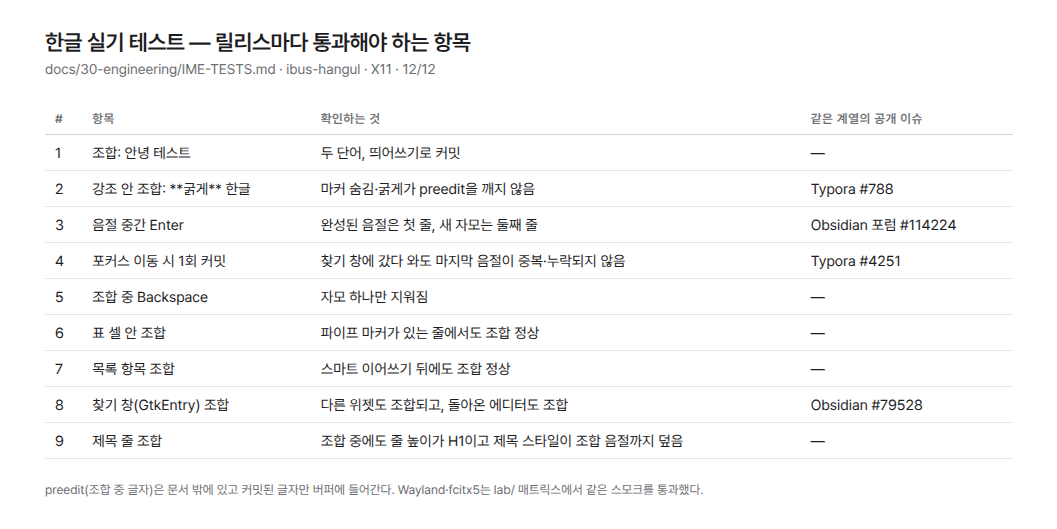
We Do Not Claim Support for Environments We Have Not Verified
The environment we verify directly for every release is the Linux shell with X11 and ibus.
We verify basic composition behavior for Wayland and fcitx5 across 8 separate experimental environments. But the scope of testing is not the same. The macOS and Windows shells are still under development as well. We do not claim to support the input behavior of each operating system until verification is complete.
There are also problems that mori cannot fix. A representative example is the input method starting in English mode every time a new input window opens. After closing the Find window and returning to the editing screen, you may need to press the Korean/English toggle key again.
This behavior is common across GTK apps and can be changed in the input method settings. We do not describe something that is not our bug as though it were our bug. Instead, we document where the setting can be found.
An editor in which Korean can be entered is different from an editor that is good for writing in Korean.
The former accepts the characters. The latter keeps the text from shifting even while you type.