Why We Built Platform-Specific Shells Around a Single Rust Core
There is a way to build the UI only once when releasing the same editor for three operating systems. We went down that path once, then turned back and placed a set of thin, platform-specific shells on top of a single core.

To release the same editor for Linux, macOS, and Windows, you have to build the UI three times.
At first, we wanted to avoid that cost. We used a single cross-platform toolkit to draw the same screen on all three operating systems. That decision got us through the first performance gate and the first milestone for Korean input.
Then our priorities changed.
Performance matters more than design, and design matters more than cost. Time and cost are excluded from the constraints.
When we looked at it again using these criteria, the answer changed too.
We Gave Up on a Single UI
Cross-platform toolkits have clear advantages. A feature built once can be used across multiple operating systems.
But there were costs to pay in return. It used 40–60MB more memory, and startup was 150–200ms slower. Text rendering fell short of the operating systems’ native text engines, and we could not fully use system-specific visual effects.
It was a reasonable choice when development cost mattered. But once cost was removed from the constraints, there was no longer any reason to accept those tradeoffs.
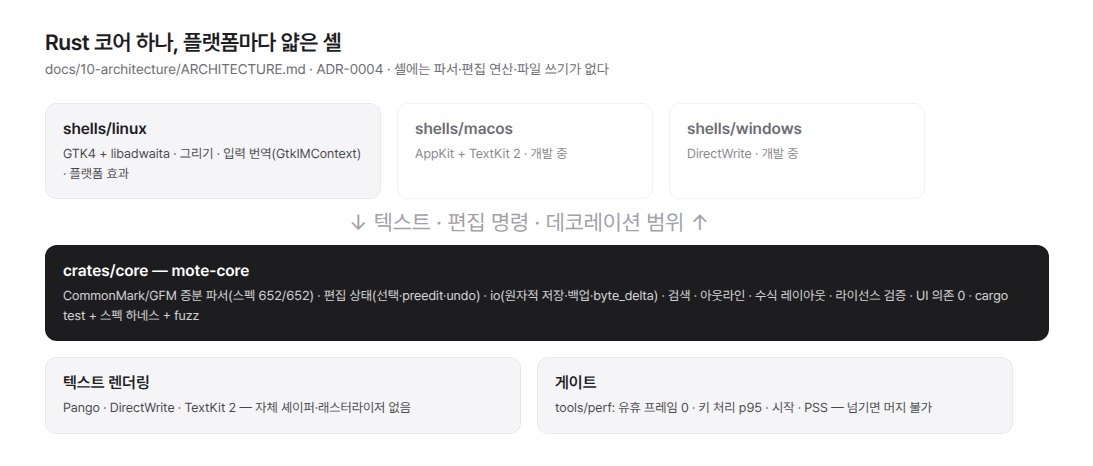
So we decided to build the document-processing core in Rust and create a separate shell for each operating system to handle the interface.
It was not because the existing technology was bad. When priorities change, the same options can produce a different answer. We decided to pay the cost of building features three times in exchange for regaining performance, text quality, and an experience that feels native to each system.
But we did not throw everything away.
We kept the measurement discipline intact: keep the pointer outside the window, find the window precisely by name, and count frames synchronously. We also carried over the design principles for Korean input. We show the operating system only the line containing the cursor, and we do not style characters while they are being composed. If the state falls out of sync, we do not guess; we synchronize it again.
Code can be discarded, but validated principles remain.
We Kept the Shell’s Role Small
If the platform-specific shells start taking on too much work, the three products quickly diverge. So we clearly defined what the shells should and should not do.
A shell creates the window and draws text. It passes keyboard and pointer input to the core, and turns Korean input into editing commands. It also applies the operating system’s visual effects.
It does not, however, parse Markdown. Apart from line wrapping, it does not determine layout, nor does it save files or make licensing decisions.
We did not merely write this principle down in a document. If Markdown-parsing code enters a shell, an automated check stops the build.
If syntax starts being processed in only one shell, the results may gradually differ across operating systems. Problems like this are also difficult to find. A table might look different in only one shell, while the actual cause may not be the code that draws the table.
We Built Only the Core to Last
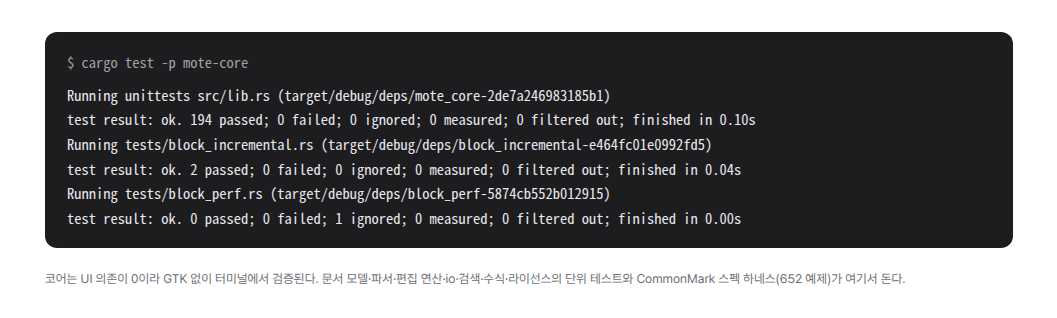
The core does not depend on any UI technology. It can be tested on its own in a terminal without a window.
The core handles document editing, Markdown parsing, undo, search, outlines, file saving, export, and license validation.

When the user presses a key, the shell passes that input to the core. The core modifies the document and reparses only the area around the change. After calculating only what is visible on the screen, it returns the changed results to the shell. The shell redraws only the affected lines and completes a frame.
If the entire document is reread during this process, that is not merely a performance issue. It means we have violated the budget we set at the beginning.
Correctness is also verified only once, in the core. It must pass all 652 official CommonMark examples, and the build fails if the number of passing examples decreases. We also run fuzzing tests that continuously feed it unexpected input.
We also check whether a saved file is byte-for-byte identical to the original. If the round-trip ratio falls below 1.0, it is not slow; it has lost the file.
Even when the shell changes, the core remains the same. On Linux and Windows, we link the core directly, while on macOS we use Swift bridging code. The macOS shell is being built with AppKit and TextKit 2, and the Windows shell with DirectWrite.
The goal is to keep the document the same while making the feel native to each operating system.
The Document Is the Same, but the Experience Is Different
Once we defined the boundary, it also became clear what needed to be standardized.
What needs to be standardized is the document. No matter which operating system saves it, the file contents must be identical at the byte level. Table alignment, line endings, and the final newline must not change either.
Markdown correctness is already verified in the core. There is no need to prove it again every time we build a new shell. What needs to be checked on a new platform is the experience and performance.
Conversely, we do not standardize the experience users directly interact with.
Text is drawn using each operating system’s text engine. Korean input methods also use the operating system’s mechanisms directly. Translucency effects likewise use system features on macOS and Windows, while on Linux, where the same features are unavailable, we draw only the necessary parts ourselves.
We do not force the position of window buttons, the form of menus, or shortcut modifier keys to match. Showing the same pixels on different operating systems is not the goal. It is more important for the editor to feel natural on each operating system.
We also set release requirements separately for each operating system. A release can ship only after it passes the performance criteria and completes real-world testing with the default Korean input method.
A row for a platform is added to the benchmark table only after an actual build exists. If we fill in a row that has not been measured, even the rest of the table becomes difficult to trust.
This Choice Has Clear Costs
We have to build the same features three times. We also have to implement Korean input three times and maintain three build environments.
We cannot build or debug Windows and macOS on the machine we currently use. Separate hardware and automated environments are required. That is why we do not assign dates to those two platforms.
We also documented the conditions under which this decision should be reconsidered. Excluding cost from the constraints is a premise of the decision. If we cannot secure the necessary hardware, we will delay only the schedule for that platform. The Linux release will proceed as planned.
A decision needs not only reasons, but also conditions for reconsidering it. That way, when circumstances change, we do not repeat the debate from the beginning.
The core is what must endure. The shells must always be disposable.
We entrusted platforms with only what could be discarded.