Why We Defined the Rules for Enter So Paragraphs Look the Same in Other Tools
Have you ever pressed Enter once in a Markdown editor only for the cursor to move down two lines, or seen paragraphs that looked separate on the screen merge into one block on GitHub? They are two sides of the same question.
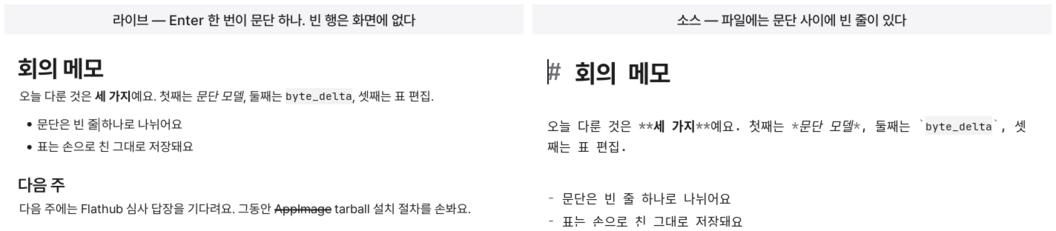
What should happen when you press Enter in a Markdown editor?
On the screen, it should move down just one line. But the file needs two line breaks to separate paragraphs. This seemingly simple difference defines the character of the editor.
mori chose a way to let you write paragraphs naturally while preserving the file exactly as it is.
Press Once to Move Down One Line
In mori, Enter creates a new paragraph.
On the screen, it moves down one line, while two line breaks are inserted into the file. If there is already a line break next to the caret, it counts as half of the separator. So no matter what is around it, pressing Enter once creates one row.
If you only want to break the line within the same paragraph, press Shift+Enter. One line break is inserted into the file, and the next line remains in the same block. This is useful when lines need to stay together, as in an address or a poem.
The blank line between paragraphs does not appear separately on the screen. That is because it serves as the separator between paragraphs. The caret does not rest on it either. Pressing Backspace removes the paragraph break all at once.
Each input moves the screen one line at a time.
The File Remains Proper Markdown Too
Markdown separates paragraphs with two line breaks.
Treating a single line break as a paragraph causes problems. In files created by others, the spacing between paragraphs doubles, while files created in mori merge into a single paragraph on GitHub or in Pandoc.
To accommodate this model, Typora normalizes the file when saving. For example, it reduces three blank lines to one. mori does not modify the file on your behalf. Its principle is not to add or remove bytes that the user did not write.
Instead, it established one more rule.
It does not create lines that exist in the file but can neither be seen nor edited. It hides only the one blank line that separates paragraphs and shows all the rest on the screen.
Blank Lines Needed Rules Too
At first, only the first line among consecutive blank lines was treated as a paragraph separator.
Then something strange happened. Typing on a blank row joined the text to the paragraph below, and creating a new paragraph required pressing Enter one more time. After deleting a paragraph, one blank row would sometimes remain.
There was one cause. A paragraph separator is a pair of two line breaks, but only one of them had been counted as the separator.
Now, separators and empty paragraphs alternate within a sequence of consecutive blank lines. Three blank lines in the file become one blank row on the screen. Because an empty paragraph is also a row, it needs a separator on both sides.
The cases where Enter reuses a nearby line break were also clarified. It reuses only a line break that connects two lines in the same paragraph. A line break already used as part of a paragraph separator is not reused.
Backspace follows the same principle. When an empty paragraph is deleted, that row and its surrounding separators disappear together. Pressing it once removes only one row.
This behavior is tested on both the screen and in the file. The same test checks not only the height of rows on the screen but also the bytes actually stored in the file.
Source Mode Shows the File Exactly as It Is
The paragraph rules apply only to live mode and reading mode.
In source mode, every line gets its own row. Blank lines are shown as they are, and the caret can go anywhere. Pressing Enter inserts only one line break.
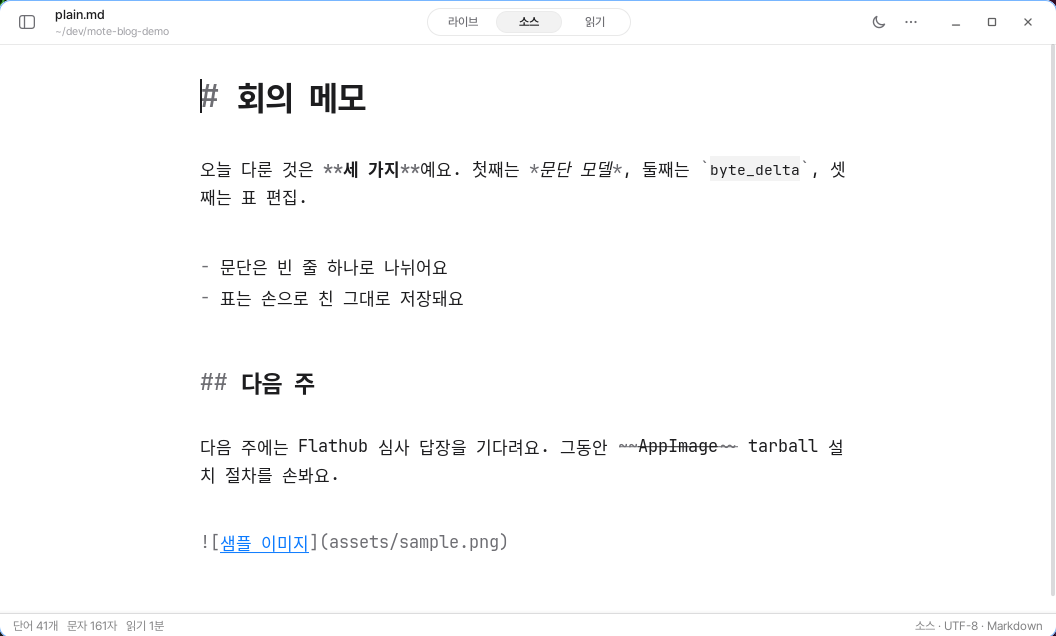
If an interpretation has been added to what appears on the screen, there must also be a place where that interpretation can be removed so the original can be viewed. That is also why source mode is necessary when working with tables or code blocks.
Showing Everything as It Is Also Has Limitations
If the file ends with a line break, one empty row appears at the end.
The final line break is not a separator between two blocks. It is a place where the next character can be entered. That is why it is not hidden.
Documents separated by a single line break in older versions of mori now appear as one paragraph. That is the result that conforms to Markdown rules. To separate the paragraphs, press Enter once more at that position. mori does not secretly modify the file.
A paragraph does not exist only on the screen, nor does it exist only in the file. mori was designed so that paragraphs can be written naturally on the screen while remaining proper Markdown in the file.