FeaturesPricingDocsBlog
Get mote
← Blog
Engineering·June 20, 2026·4 min read

Markdown Wasn’t the Cause of the Bloat—the Web Engine Was

If the fan spins just because a Markdown editor is open, it's not because Markdown is expensive. When the same document is measured under the same conditions, the cost comes from the rendering engine and clock-driven loops.

m
mote
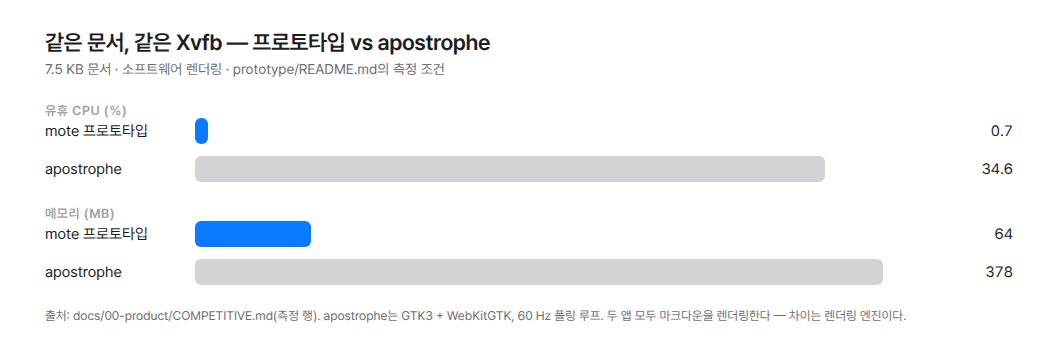
Idle CPU and memory usage of two apps measured with the same 7.5 KB document in the same Xvfb environment. The shorter bars at the top represent the prototype without a web engine.

I left a Markdown editor open on my laptop. I wasn't typing anything, but the fan started spinning.

At first, I thought Markdown was the reason. I thought it was slow because it kept redrawing the document.

Was that really the case?

I Compared Them Under the Same Conditions

I kept the screen size, rendering method, and document the same. I opened a 7.5 KB, 113-line document and did nothing for 25 seconds. When typing, I entered the same characters at the same speed.

Apostrophe, which renders its preview with a web engine, used 34.6% CPU and 378 MB of memory while idle. It had five processes.

The prototype, which rendered the same document inline without a web engine, used 0.7% CPU and 64 MB of memory. It had one process.

Both were rendering Markdown, but the results were very different.

When I turned off only the preview in apostrophe, CPU usage fell to 7.0% and memory usage to 133 MB. The app and the toolkit remained the same. The only thing that changed was how the preview was rendered.

I also measured a text editor that did not render Markdown at all. It used 2.2% CPU and 79 MB of memory.

The prototype that rendered Markdown was actually lighter.

That was when it became clear. Markdown wasn't the problem.

It Was Working 60 Times per Second Even When Nothing Was Happening

The cause was in the code that synchronized the preview scroll position with the document.

This code did not run only while scrolling. Every 16 ms, a timer woke up and executed JavaScript in the WebKit process. When the response arrived, it scheduled the timer again.

It was working about 60 times per second even when no one touched the window.

When you use a web engine, the area where you edit the document and the area where you render the preview become two separate worlds. The easiest way to keep the two states synchronized is to keep checking. Unless idle CPU usage is measured separately, this cost is difficult to see.

The difference grew even larger while typing. Apostrophe used 180% CPU, while the prototype used 41%.

One went all the way to the browser process every time a key was pressed. The other reapplied tags only to the lines that had changed.

I Turned the Measurements into Design Principles

The prototype had no special optimizations.

Styles were applied over the text using tags. Multiple edits were grouped into a single one-shot idle callback that removed itself. The range where tags were reapplied was limited to the lines that had changed. It also used only one process.

I hadn't added anything. I had simply left out what wasn't needed.

Afterward, I established two design principles.

First, don't include a web engine as a dependency.

Second, if the document hasn't changed and there is no animation, don't schedule frames, timers, or ticks.

These principles are difficult to apply later. A web engine isn't just a library; it changes the structure of the app. Once it is added, removing it effectively means rebuilding the app. Without rules, timers also multiply one by one with each feature.

In return, I had to give up the easy path. I couldn't check for file changes by polling, and I couldn't leave formulas to a webview. I had to build the necessary layouts myself.

To keep the principles from becoming blurred, I measure again on real hardware with every release.

Output from the performance gate running on a real GPU. After the window appears, the number of frames drawn while idle is 0, and CPU usage is 0.10%.

There Are Also Caveats When Looking at the Numbers

The experiment used software rendering. CPU usage is higher than in an environment with a real GPU. That is why the ratios matter more than the absolute values.

Most of the prototype's 0.7% idle CPU usage was also consumed by the blinking cursor. When blinking was disabled, it was difficult to distinguish from zero.

This does not mean that every web-engine-based app has the same problem. These results are limited to apostrophe. Some engines, such as those in the Chromium family, reduce work while idle.

The prototype also did not have many features. It lacked tables, formulas, export, and search. The comparison extends only to rendering costs.

Still, one thing was clear.

Markdown wasn't what created the cost. It was the rendering engine and the loop that never stopped.

Once you identify the cause precisely, lightness becomes subtraction rather than a new feature.

← OlderWhy We Built Yet Another Markdown EditorNewer →One Document, Even When You Switch Modes
Follow along by RSS.
Nothing but writing.
English
© 2026 mote