Why We Decided to Bundle GTK for a Consistent Look Across Every Installation Format
The reason the same app can look slightly different across distributions is usually not the app itself, but the version of the toolkit installed on the system. Starting with beta.2, all four installation formats carry the same libraries.
A Linux app can look different across distributions even when it is the same build. Switches can look different, dialog spacing can be off, and sometimes windows may not open at all. That is because each system has a different toolkit installed.
mori has also maintained two kinds of builds. The .deb used the system GTK, while the AppImage, tarball, and Flatpak bundled the libraries they needed.
Starting with beta.2, we have unified them into a single build.
Different Installation Methods, Same App
Now the .deb also includes GTK 4.22 and libadwaita 1.9 in /opt/mori. Regardless of the libraries installed on the system, it can be installed with apt install on Ubuntu 22.04 and Debian 12. Its appearance and behavior are also the same as the AppImage, tarball, and Flatpak.
The bundled libraries are aligned with Flatpak's GNOME runtime. They are GLib 2.88, Pango 1.56, HarfBuzz 11, cairo 1.18, and fontconfig 2.16. We build them ourselves in a glibc 2.35 container so that the app can run on older distributions.
The goal is to reduce the number of cases we need to check. When using the system GTK, each Ubuntu version has a different toolkit. Version 24.04 has 4.14, 24.10 has 4.16, and 25.04 has 4.18. Every time we change a single line of styling, we have to check all of those combinations. Now we only need to check the installation methods.
We also considered getting rid of the .deb. But on Ubuntu Desktop, apt is the most familiar installation path. AppImage launches about 140 ms more slowly and requires FUSE. The tarball has no automatic updates, while Flatpak requires sandbox exceptions and a runtime of about 1 GB.
So instead of getting rid of the .deb, we changed what is inside it.
We Bought Consistency for 14 MB
There is a cost. The .deb grew from 4 MB to 34 MB. PSS memory usage when opening the same document also increased from 115 MB to 129 MB. That is because the libraries bundled with the app cannot be shared with other GTK apps.
Performance was maintained. The p95 time from keystroke to display decreased from 4.82 ms to 4.07 ms. The median time until the first screen appeared also became slightly faster, from 306 ms to 303 ms. As before, the app does not draw frames when it is simply left open.
In exchange for using 14 MB more memory, we got the same app on every distribution.
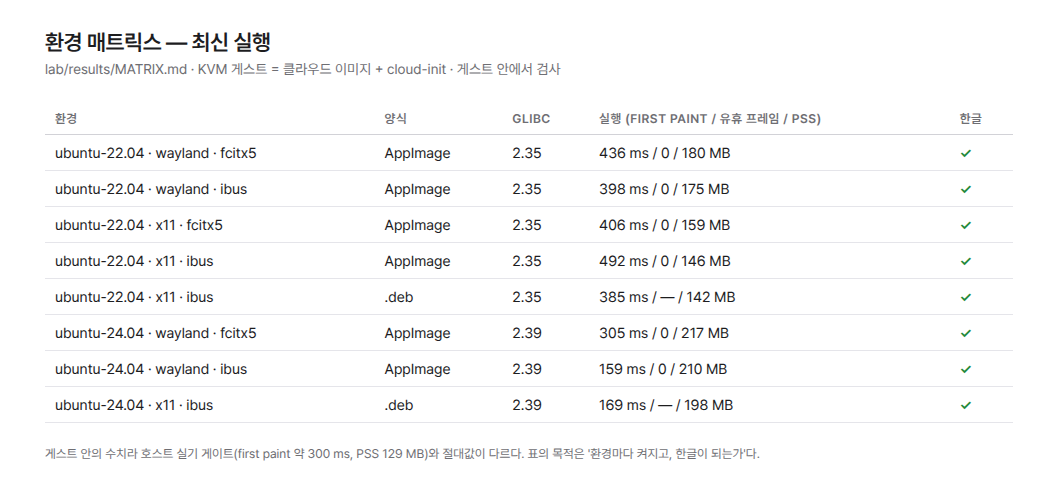
Upgrading the bundled toolkit is a routine task performed about once a year. When Flatpak's GNOME runtime is upgraded, we upgrade the bundled versions along with it. At that point, the eight rows in the lab become the gate for that update.
mori Sets the Style; Users Set Accessibility
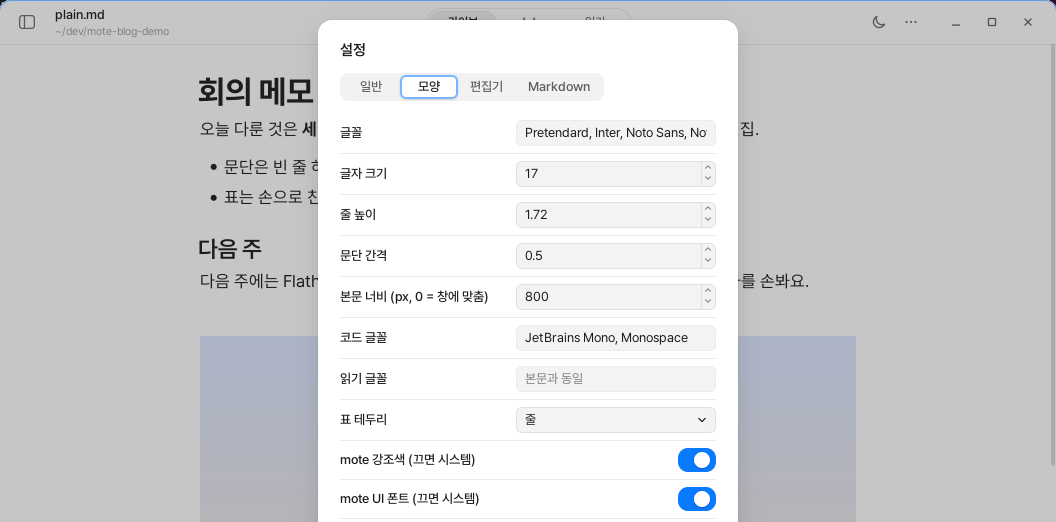
We also cleaned up the branding settings. The accent color and UI font use mori's defaults, and the same values are applied to libadwaita widgets. If you want to follow the desktop settings, you can turn off the two switches under Settings → Appearance.
Accessibility settings, however, always follow the user's choices. The app does not override text scaling or HiDPI settings. Users who have enabled large text can see large text in mori as well. Dark mode can also be set directly to system, light, or dark.
We Tested Korean Input in Eight Environments
When the toolkit changes, the input method is the first thing to examine. We tested Korean input in eight environments combining installation formats with ibus and fcitx5, X11 and Wayland, and Ubuntu 22.04 and 24.04. All of them passed.
We also revised the tests so that they do not rely on development-only inspection features. Now, after installing the files we actually distribute, we verify that Korean character composition works correctly.
The surest way to make the same app everywhere is to start by reducing the conditions that can vary.